How to find a hidden camera with your iPhone
Start with your eyes and a flashlight: look at everything that faces the bed, shower or sofa, and sweep a light across the room looking for the small reflection a lens gives back. Then check the Wi-Fi for devices made by camera companies or answering as cameras. No single method finds every camera, and a clean result from any of them means nothing was found, not that nothing is there.
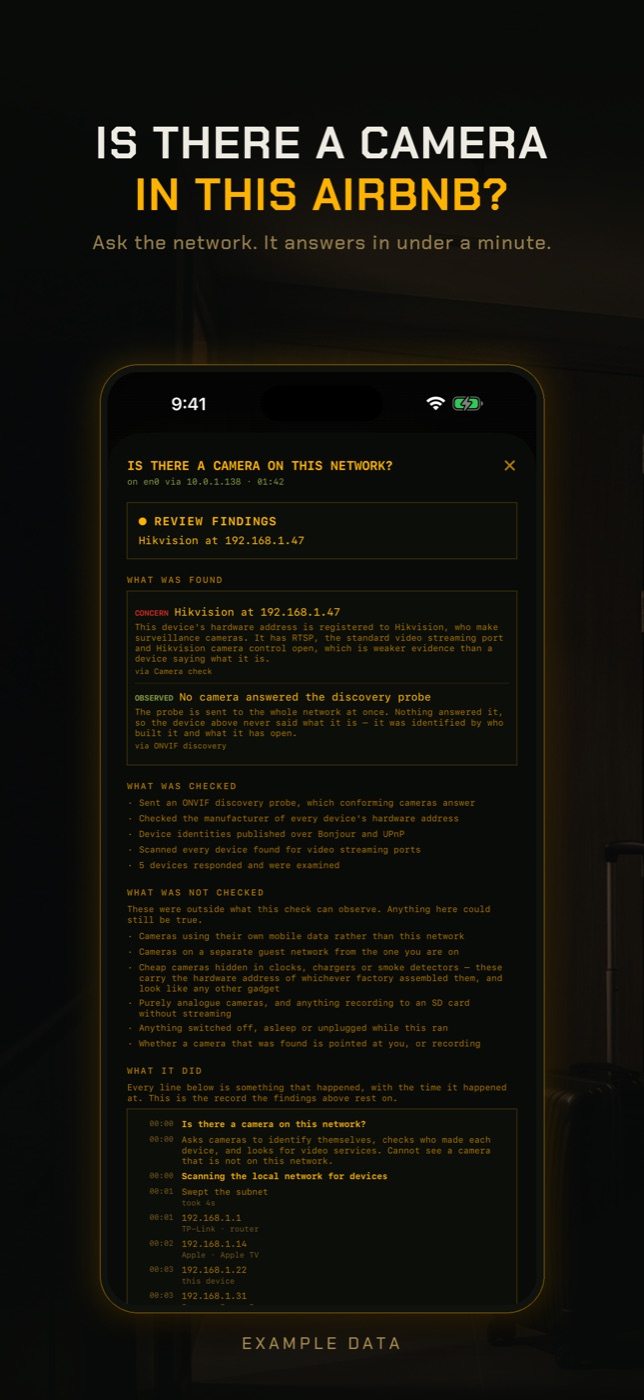
RECON's Camera Check looks for cameras on the Wi-Fi network you are connected to. It does not detect lenses, infrared or radio signals; it uses four network signals and tells you which one each finding came from, what it checked, and what it could not check.
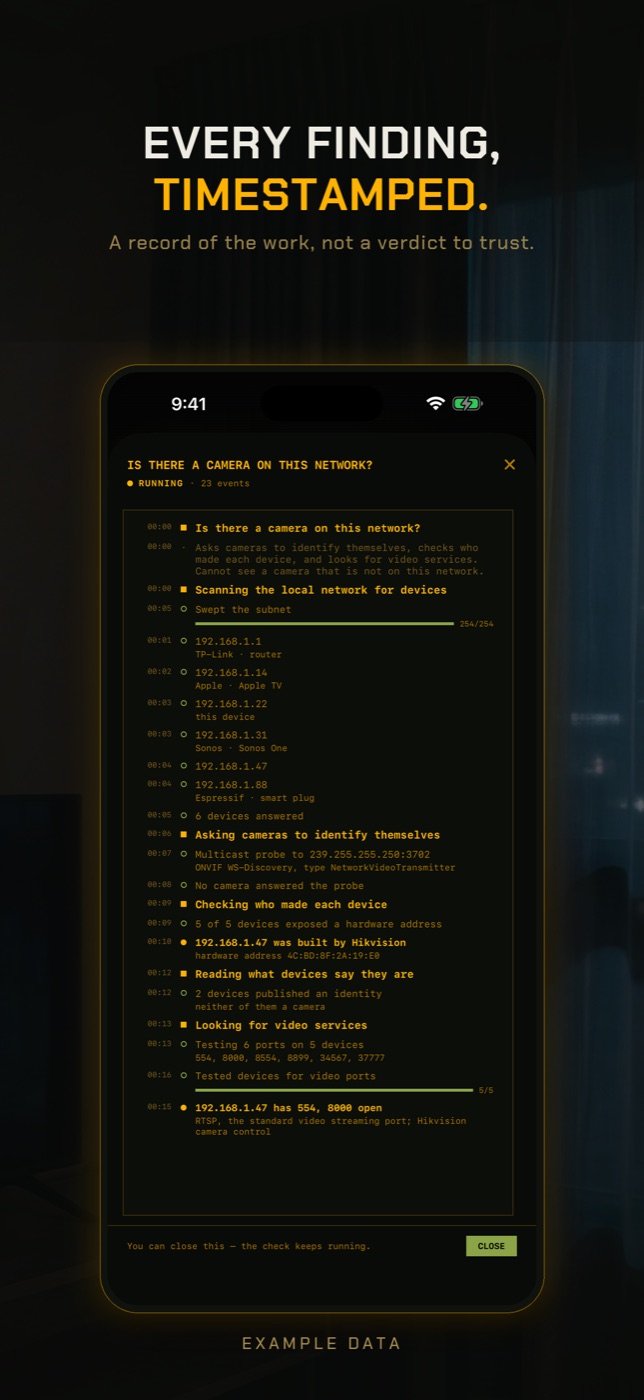
- Join the rental's or hotel's Wi-Fi, then tap RUN on Camera Check in the checks row. It takes about one to two minutes and shows a live log of what it is doing.
- It sends an ONVIF discovery probe to the whole network at once, which standards-compliant IP cameras answer by identifying themselves as video transmitters. Because the probe is multicast, it can reach cameras that ignore a normal scan.
- It scans the network and checks the manufacturer of every device's hardware address against a list of companies that make cameras and little else, such as Hikvision, Dahua, EZVIZ, Reolink and Wyze. This catches cloud cameras that answer no protocol and open no port. It also reads what devices publish about themselves over Bonjour and UPnP, which can name a camera or doorbell.
- It tests every device found for video streaming and camera control ports, including RTSP on 554 and Hikvision's port 8000. An open port is weaker evidence than a device saying what it is, and the result says so.
- Read all three parts of the result: the findings, what was checked, and what was not checked. A result that says nothing found means no camera answered; it never says there are no cameras.
Where hidden cameras are actually found
Spy cameras are hidden in objects that belong in a room, have a view of the space and have power. That narrows the search more than people expect. The usual hosts are smoke detectors, alarm clocks, USB phone chargers and plug adapters, wall outlets and light switches, air purifiers, picture frames, tissue boxes, bookshelves, television set-top boxes and anything with a small hole that does not need one.
Think about the view before the object. A camera placed to record guests points at the bed, the shower, the toilet or the place where people get changed. Stand where you would be most exposed and look at what faces you. A smoke detector on a wall rather than the ceiling, a clock angled at the bed, or a charger plugged in where nobody would charge a phone deserves a second look.
In a rental, the realistic device is a cheap consumer camera bought online, not professional equipment. That matters for detection: cheap cameras are usually Wi-Fi cameras that stream to the maker's cloud, which means they are on the network you are on, and they often ship with bright infrared LEDs for night vision.
The flashlight and lens-glint method
Every camera, however small, has a lens, and a lens reflects light straight back towards its source. Turn off the room lights, close the curtains, and hold your iPhone's flashlight at eye level next to your face. Sweep it slowly across the room and look along the beam for a small, sharp blue or purple point of light that stays in place as you move. Glass, screens and jewellery reflect too, so walk towards anything that glints and look at it closely.
Looking through a cardboard tube or rolled paper helps, because it blocks light from the sides. Go slowly: a pinhole lens is often under a millimetre and only shows its reflection from a narrow range of angles.
Using the iPhone front camera to spot infrared
Many hidden cameras have infrared LEDs so they can record in the dark. Your eyes cannot see infrared, but a phone camera sometimes can. Most iPhone rear cameras have a strong filter that blocks infrared; the front camera on many models filters less. You can test yours by pointing a TV remote at the front camera and pressing a button: if you see the LED flicker on the screen, that camera can see infrared.
Then turn the lights off, open the Camera app on the front camera and slowly point it around the room, looking for small glowing dots, often purple or white, that you cannot see with your eyes. Be honest with yourself about this method. Plenty of cameras have their infrared off when the room is lit or use no infrared at all, some iPhone front cameras filter it too, and many ordinary devices have status lights. It can find something; it cannot clear a room.
Airbnb hidden camera rules
Since 30 April 2024, Airbnb has banned indoor security cameras in all listings, whatever the room and whether or not they are disclosed. Outdoor cameras and doorbell cameras are allowed only if the host discloses them in the listing, and they may not look into indoor spaces or be placed in areas like outdoor showers or saunas. If you find a camera indoors in an Airbnb, you do not need to decide whether it was disclosed: it is not allowed.
If you find one, do not unplug it or throw it away first. Photograph it where it is, including what it faces, then leave or move somewhere you are comfortable and contact the platform. For a hotel, speak to the manager. In most countries recording people in private spaces such as bedrooms and bathrooms is a crime, and the local police can take a report.
Do hidden camera detector apps work?
Many hidden camera detector apps claim to find cameras with the magnetometer, which only reacts to magnets and metal near the phone and flags speakers and wiring as readily as a camera. Others are a flashlight or a camera filter with a new name. Treat any app that promises a definite answer with suspicion. What a phone can genuinely do is ask the Wi-Fi what is on it, which is a real signal with real limits, described below.
How to check without an app
The physical search finds cameras that a network check never will, and the network check finds cameras hidden too well to see. Do both.
- Do a physical sweep. Check smoke detectors, clocks, USB chargers and plug adapters, wall outlets, air purifiers, picture frames, speakers and anything that faces the bed, shower, toilet or sofa. Look for small holes, lenses and objects that are oddly placed or oddly angled.
- Use the flashlight method. In a dark room, hold the iPhone flashlight next to your eyes and sweep slowly, looking for a pinpoint reflection that stays put as you move.
- Use the front camera in the dark to look for infrared LEDs, after checking with a TV remote that your front camera can see infrared. Treat a glow as something to inspect, and treat no glow as no information.
- If you can reach the router's admin page or the host has left the router accessible, open its device list and look for camera brand names or devices you cannot account for. Most guests will not have the admin password, and that is normal.
- Unplug or cover anything you are unsure about, and check whether a device's power cable leads somewhere unexpected.
- Know the rules: on Airbnb, any indoor camera breaks policy regardless of disclosure. Report it to the platform and, for a camera in a bedroom or bathroom, to the police.
What this cannot tell you
A clean network result is not the same as no cameras, and it is worth knowing exactly why.
- Cheap cameras hidden in clocks, chargers and smoke detectors often carry the hardware address of whichever factory built their Wi-Fi module, so they look like any other smart gadget. If such a camera also only talks outbound to its vendor's cloud and answers no discovery probe, the network check has nothing to recognise. The same applies to brands whose hardware addresses are shared with non-camera products, which the camera-maker list deliberately leaves out.
- A camera on a separate network, such as a hidden second Wi-Fi, a guest network or the host's own network, is invisible from the one you joined. So is a camera using its own mobile data SIM.
- A camera that is switched off, asleep, or only records to a memory card without streaming does not appear on any network while you are looking.
- Networks with client isolation, common in hotels, stop your phone from reaching other devices. The discovery probe can still work on some of these networks, but the scan cannot, and the result is marked as limited coverage.
- Even when a camera is found, the check cannot tell you where it is in the building, what it is pointed at, or whether it is recording. A camera found on a large hotel network may be in a corridor or the lobby.
- The flashlight and infrared methods have their own blind spots: well-recessed lenses, cameras with infrared turned off, and front cameras that filter infrared. None of the methods, alone or together, can promise a room is clear.
How do I find a hidden camera with my iPhone?
Turn the lights off and sweep the iPhone flashlight slowly across the room looking for a lens reflection, use the front camera to look for infrared LEDs, and physically check anything facing the bed or bathroom. Then check the Wi-Fi for devices made by camera companies.
Can my iPhone detect a hidden camera?
Not directly. It has no sensor built for it. It can help you see lens reflections with the flashlight, sometimes see infrared with the front camera, and look at what is on the Wi-Fi. Each of those finds some cameras and misses others.
Are hidden cameras allowed in Airbnbs?
No. Since 30 April 2024 Airbnb bans indoor security cameras in every listing, disclosed or not. Outdoor and doorbell cameras must be disclosed and may not view indoor spaces.
How do I check for hidden cameras in a hotel room?
Do the same physical sweep and flashlight check you would anywhere. Hotel Wi-Fi often isolates guests from each other, so a network check may see little, and a camera found on a large hotel network could belong to the building rather than your room.
Do hidden camera detector apps actually work?
Most do not do what they claim. Magnetometer-based detectors react to any metal or magnet, including speakers. An app that checks the Wi-Fi can find some cameras, but none can confirm a room has no cameras.
Can a hidden camera work without Wi-Fi?
Yes. Some record to a memory card, and some use their own mobile data connection. Neither appears on the room's Wi-Fi, which is why a physical search still matters.
What should I do if I find a hidden camera in my Airbnb?
Photograph it in place, including what it faces, without tampering with it. Move somewhere you feel comfortable, report it to Airbnb, and contact local police if it was in a bedroom or bathroom.
Everything above that needs a scan, the app does in one tap on the Wi-Fi you are on, and it says what it could not see. Get RECON for iPhone — one-time purchase, no account, nothing leaves the device.