Fing alternative for iPhone: RECON vs Fing
If you want the deepest device recognition, apps for Android and desktop, and a free tier, Fing is the better choice. If you want an iPhone scanner with no account, no telemetry and a one-time price that adds port scanning, TLS, WHOIS, Shodan and CVE alerts, RECON is the alternative. This page covers both, including where Fing is ahead.
What Fing is in 2026
Fing is a network scanner that has been around for more than a decade. It runs on iPhone, Android, Windows and Mac, in a web app, and as Fing Agent, a small always-on monitor you install on a Raspberry Pi, a Docker host or a NAS. The iPhone app has about 116,000 ratings on the US App Store at 4.6 stars.
The free plan on Fing's pricing page allows up to 3 scans per day, plus speed tests, network and ISP reports, and troubleshooting tools such as ping, traceroute and an open port check. Premium costs $7.99 a month or $69.99 a year and adds continuous monitoring, a full event timeline, blocking and limiting devices, automatic blocking of unknown devices, two monitored networks, notifications, the hidden camera detector and router vulnerability checks. Professional costs $16.99 a month or $149.99 a year and is aimed at teams. The iPhone app also sells a Starter plan ($3.99 a month or $39.99 a year) and ad removal, so the free version shows ads.
Continuous monitoring needs Fing Desktop or Fing Agent running on your network; the phone alone does not watch the network while the app is closed. Fingbox, the hardware box Fing sold from 2017, is no longer on sale, and its old product page now shows Fing Agent instead.
Where Fing is better
A comparison that only favours one side is not useful, so here is what Fing does better than RECON.
- Device recognition. Fing matches devices against a large database of brands, models and operating systems built from years of user scans. It will name more of your devices, more often, than any tool that relies only on what devices announce about themselves.
- Platforms. Fing runs on Android, Windows, Mac and the web. RECON is iPhone only.
- History and monitoring. With Desktop or Agent, Fing watches your network around the clock, keeps a timeline of devices joining and leaving, and can block a device. RECON runs when you open it.
- Price to start. Fing has a free tier. RECON costs $14.99 up front, with no trial.
- Hidden camera database. Fing checks found devices against a list of known camera models. RECON's Camera Check uses a narrower method, described below.
What leaves your phone when you use Fing
Fing's device recognition is a server-side lookup. Its privacy policy says that for users without an account it collects the originating public IP address and the MAC addresses of the devices you submit for device recognition, and that you can turn device recognition off. With an account it also holds your name, email address and location. The policy mentions SDKs through which analytics providers and advertising platforms can collect information. On the App Store, Fing's privacy label lists data not linked to you in categories including location, identifiers, usage data and diagnostics.
None of that is hidden, and it is how a recognition database gets built: your scans help name the next person's devices. The trade is that a list of the hardware on your network, tagged with your public address, leaves your phone. Whether that matters depends on where you are scanning. At home most people accept it. On a client's network, or in a rental you do not trust, you may not want to.
Where RECON is different
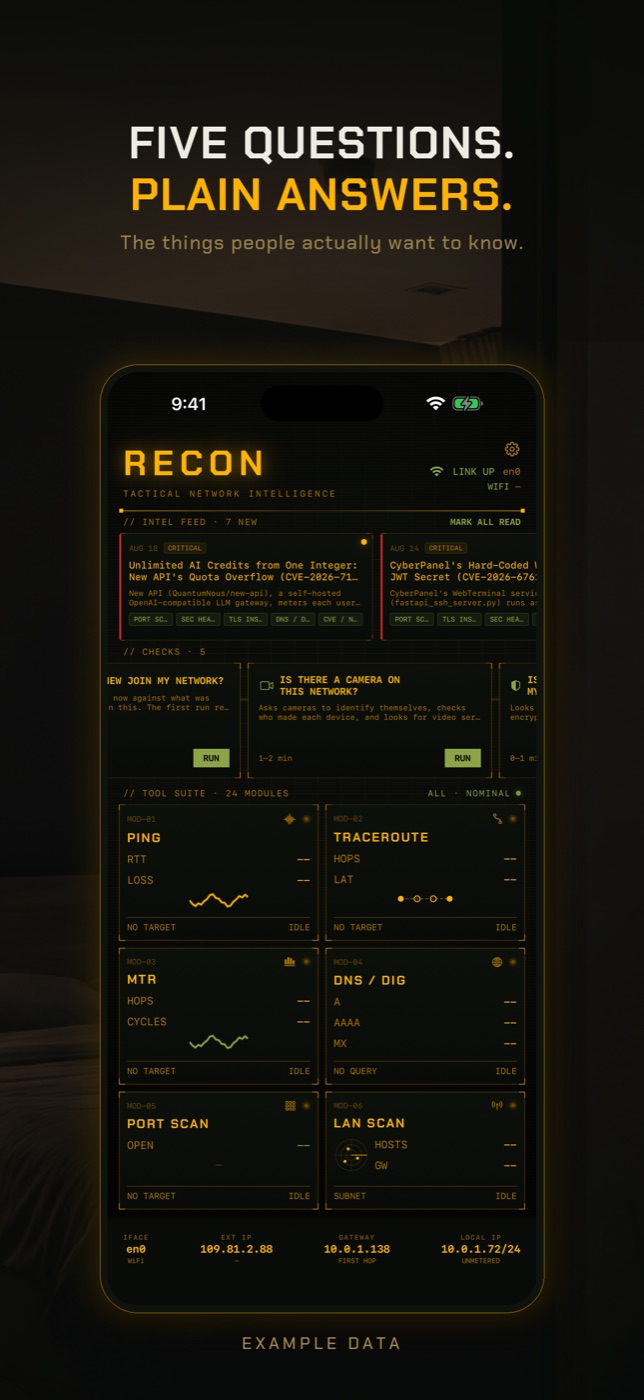
RECON has no account, no analytics and no telemetry. It is $14.99 once, with no subscription and no in-app purchases. Scans run on the phone and results stay on the phone. Some tools have to reach an outside service to work, and they call it directly from your phone, not through a RECON server: Shodan Lookup and the Exposure Check ask Shodan InternetDB about an address, WHOIS asks the registry, Speed Test downloads from a test server, and CVE Watch reads NVD and the CISA KEV list.
It is built for people who want to go past the device list. You can take a host from LAN Scan into Port Scan, which covers ports 1 to 65535 and reads banners to identify the service, then into TLS Inspect for the certificate chain and cipher, then WHOIS for who owns a domain or address. DNS Lookup queries any record type against any resolver. Traceroute draws the path on a map, and MTR keeps measuring each hop. CVE Watch lets you list the products and devices you run and tells you in the background when one of them is added to the known-exploited list.
Checks that say what they could not see
RECON has five guided checks: Slow Internet Check, Exposure Check, New Device Check, Camera Check and Tampering Check. Each one reports what it found, what it checked, and what it could not check. The verdicts are NOTHING FOUND, REVIEW FINDINGS or COVERAGE LIMITED. None of them says your network is safe.
The Camera Check shows why this matters. It sends an ONVIF discovery probe, scans the network, and matches hardware address prefixes against a list of companies that only make cameras. On a hotel network with client isolation it cannot see other guests' devices at all, and a camera that only talks to its maker's cloud may not answer. When nothing answers, RECON says no camera answered and lists those limits, rather than showing an empty screen that reads like good news. The Exposure Check looks up your public address in Shodan's passive data; if Shodan has never scanned that address, it says so instead of reporting nothing open.
What RECON does not do
iOS does not let any app read the phone's ARP table, so an iPhone app cannot simply list every device's hardware address. RECON names a device from what the device announces over Bonjour and UPnP, plus the hardware address when a device publishes one. That is less than a recognition database, and some devices will show as an address with nothing else. RECON does not monitor your network while it is closed, does not block devices, does not run on Android or a computer, and needs iOS 17 or later.
Which one to pick
Pick Fing if you want a free tool to see who is on your home Wi-Fi with friendly device names, if you use Android or a computer as well, or if you want 24 hour monitoring and the option to block a device. Pick RECON if you do not want an account or data leaving your phone, if you would rather pay once than subscribe, or if you need port scanning, TLS, DNS, WHOIS and CVE tracking in the same app. Some people run both: Fing at home for the device timeline, RECON on the road and on networks they do not control.
| RECON | FING | |
|---|---|---|
| Price model | $14.99 once, no in-app purchases | Free (up to 3 scans a day, ads); Premium $7.99/month or $69.99/year; Professional $16.99/month or $149.99/year |
| Account required | No, there is no account | Not for basic mobile scans; required for Fing Desktop and for syncing |
| Telemetry and analytics | None | Privacy policy describes analytics and advertising SDKs; App Store label lists data not linked to you |
| Platforms | iPhone, iOS 17 or later | iPhone, Android, Windows, Mac, web, Fing Agent on Raspberry Pi, Docker or NAS |
| LAN scan | Yes, ICMP and TCP sweep with Bonjour and UPnP | Yes |
| Device identification | From what devices announce (Bonjour, UPnP, published hardware address and vendor prefix) | Large cloud recognition database for brand, model and OS; the stronger of the two |
| Port scan | Ports 1 to 65535 with banner reading and service identification | Open port check in the free tier; scheduled checks on paid plans |
| Camera finding | Camera Check: ONVIF probe plus camera-only vendor prefixes, reports what it could not see | Hidden camera detector matched against known camera models (listed under Premium on the pricing page) |
| Exposure check | Exposure Check via Shodan InternetDB, passive | Router vulnerability checks on paid plans |
| DNS, TLS, WHOIS tools | DNS Lookup, TLS Inspect, WHOIS and RDAP | Not offered as separate tools |
| CVE alerts | CVE Watch against NVD and CISA KEV for products you list | Router vulnerability checks; no per-product CVE watch list |
| Offline use | Local tools work with no internet connection | Local scan works; recognition relies on Fing's servers |
What is a good alternative to Fing for iPhone?
It depends on why you are leaving. If you want no account and no data sent off the phone, RECON does the network scan, port scan, DNS, TLS and WHOIS work on the device for a one-time $14.99. If you want free device naming, Fing's free tier is still hard to beat.
Is Fing free on iPhone?
There is a free plan with up to 3 scans a day, speed tests and basic troubleshooting tools, and it shows ads. Monitoring, blocking, the event timeline and the hidden camera detector are in paid plans; Premium is $69.99 a year.
Does Fing need an account?
Not for basic scans in the mobile app, though Fing recommends one. Fing Desktop requires an account, and syncing between devices uses it.
Does Fing collect my data?
Fing's privacy policy says it collects your public IP address and the MAC addresses of scanned devices for device recognition, even without an account, and that you can switch recognition off. With an account it also stores your name, email and location.
Is Fingbox discontinued?
Fingbox is no longer sold. Fing now points people to Fing Agent, which runs on a Raspberry Pi, in Docker or on a NAS, including a ready-made Raspberry Pi kit.
Are there apps like Fing that do not need a subscription?
Yes. RECON is a one-time purchase with no subscription or in-app purchases. The trade is that it has no free tier and no Android or desktop version.
RECON is the LAN-side tool for iPhone: scan the network you are on, find every device, check what is exposed, no account and nothing leaves the phone. Get RECON for iPhone — one-time purchase, no account, nothing leaves the device.