Is my Ring doorbell hacked?
If your Ring doorbell is behaving strangely, the likeliest explanation is someone signed in to your Ring account, not a break-in to the doorbell itself. Look in Control Center for devices and shared users you do not know, change the password, and keep two-step verification on. The doorbell flaws found in 2019 were patched long ago.
RECON cannot read your Ring account or see who used Live View. It can check whether your home network is open to the internet and whether an unknown device has joined your Wi-Fi, which matters if you are worried someone captured your Wi-Fi password.
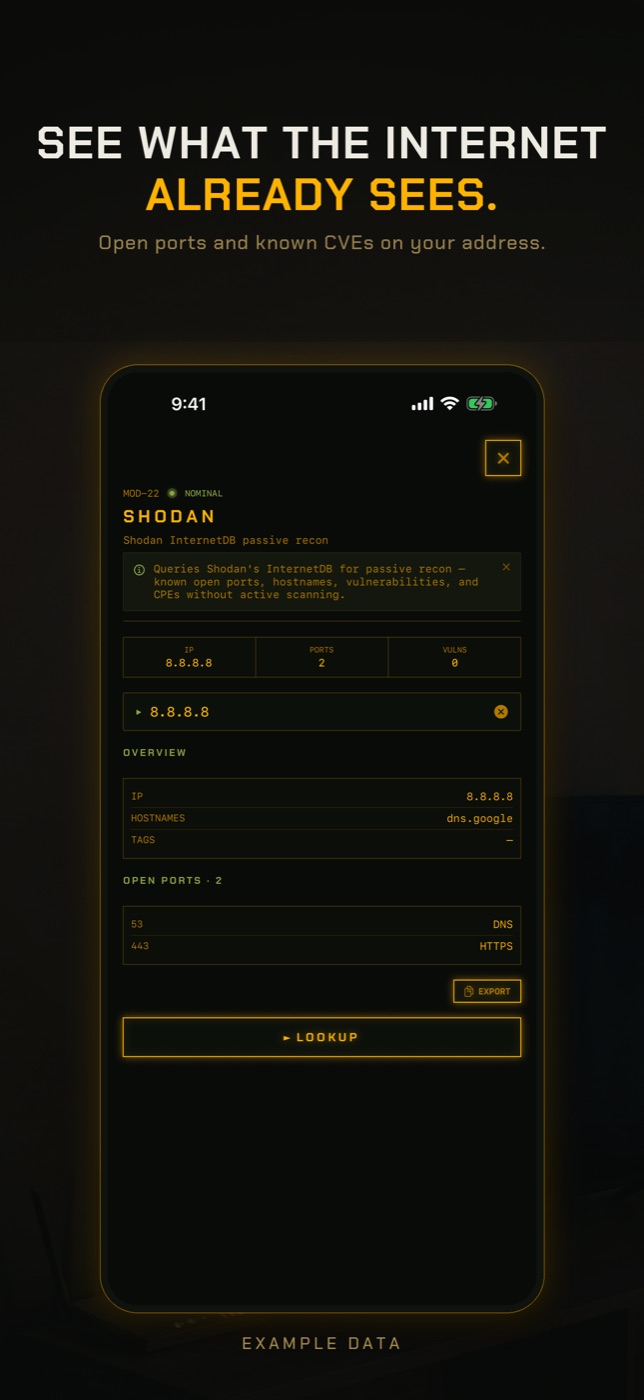
- Run Exposure Check. It looks up your network's public address in Shodan InternetDB, a record of what internet-wide scanners have seen, and lists any ports they found open, published vulnerabilities and hostnames. Port 554 is flagged by name because an open RTSP port is the usual way a camera ends up public. A Ring doorbell normally shows nothing here, since it connects outward to Ring rather than accepting connections.
- If Exposure Check says your address has never been scanned, read that literally: there is no record either way, which is not the same as nothing being open.
- Run New Device Check. The first run on a network only records a baseline of what answers, so it cannot find anything yet. Run it again later and it lists anything not seen before, matched by hardware address where it can, with the manufacturer the address is registered to.
- Open LAN Scan to find the doorbell's address and manufacturer, and run Port Scan on it if you want to see what it answers on inside your network.
What "hacked" usually means for a Ring doorbell
A doorbell is a camera, a microphone and a speaker pointed at your front door, and all three are controlled from the Ring app. Anyone signed in to your Ring account can watch Live View, talk to whoever is on your step and scroll back through every recorded visitor. They do not need to touch the doorbell or your Wi-Fi to do it.
That is why the large wave of Ring account takeovers in December 2019 involved no flaw in the devices. Attackers took passwords leaked from other websites and tried them against Ring until some worked. Ring made two-step verification mandatory for all accounts in February 2020. If your password is unique and two-step verification is on, this route is largely closed.
Signs of a hacked Ring doorbell
Most of these have innocent explanations, so check them against the people who share your home before assuming the worst.
- Live View sessions in your history that nobody in your household started.
- Someone on your doorstep says they heard a voice from the doorbell when nobody was using the app.
- A shared user you did not invite, or a login alert for a phone you do not own.
- Motion zones, privacy zones or notification settings changed without you.
- Chimes with nobody at the door. On their own these are usually a wiring or chime fault, a power problem, or a button press you missed on camera. Check the event history before treating it as a hack.
Check shared users and signed-in devices
In the Ring app, open the menu and go to Control Center. Shared Users lists everyone who can see your doorbell; remove anyone you do not expect, including old housemates and former partners, who are a far more common source of unwanted access than strangers. Authorized Client Devices lists every phone, tablet and browser signed in to the account; remove any you do not recognise, or remove all and sign back in.
Confirm two-step verification is on and that the email and phone number on the account are yours. Whoever controls that email can reset your Ring password.
The 2019 Ring doorbell flaws, and why they are not your problem today
Two real doorbell flaws were published in 2019. In February, researchers at BullGuard's Dojo lab showed that video and audio from Ring doorbells was not properly encrypted, so someone on the same network could watch the stream or inject fake footage. It is recorded as CVE-2019-9483 and was fixed in firmware 3.4.7.
In November, Bitdefender published a flaw in the Ring Video Doorbell Pro. During setup the Ring app sent your Wi-Fi password to the doorbell over plain HTTP, through an open access point the doorbell created. An attacker within Wi-Fi range could knock the doorbell offline to prompt you to set it up again, and capture the password as you did. Ring had patched it by the time the details were published.
Both needed an attacker close to your home or already on your network, and both were fixed by firmware updates that Ring installs automatically. If you set up a Ring Doorbell Pro before late 2019 and are worried, changing your Wi-Fi password closes the door on anything that was captured then.
How to check without an app
The checks that answer the question directly are in Ring's app, your inbox and your router.
- Ring app, Control Center: Shared Users, Authorized Client Devices and two-step verification.
- Ring app event history: look for Live View sessions and events you cannot account for.
- Router admin page: remove any port forwarding rules you did not create and turn off UPnP. If you suspect your Wi-Fi password was captured, change it and reconnect your devices.
- Factory reset the doorbell only after securing the account, following Ring's instructions for your model. A reset does not remove anyone from your account.
What this cannot tell you
Whether your doorbell is hacked is mostly a question about your Ring account, which a network scan cannot see.
- Who has signed in to your Ring account, or when. That is only in Control Center and Ring's login alerts.
- Whether someone watched Live View or spoke through the doorbell.
- What the doorbell sends to Ring. That traffic is encrypted and goes directly from the doorbell to your router; a phone on your Wi-Fi cannot see it.
- Whether your Wi-Fi password was captured in the past. New Device Check only shows devices that answered while it ran, and a battery doorbell may be asleep.
- The doorbell's firmware version. Check that in the Ring app under Device Health.
Can Ring doorbells be hacked?
Rarely through the device. The common case is someone signing in to your Ring account with a reused password. Two firmware flaws were published in 2019 and both were patched.
Why did my Ring doorbell ring with nobody there?
Usually a chime wiring or power fault, or a button press you missed. Check the event history first. A phantom chime on its own is not a sign of hacking.
Can someone see my Ring doorbell without me knowing?
Anyone with access to your account or listed as a shared user can. Check Shared Users and Authorized Client Devices in Control Center.
Did the Ring doorbell leak Wi-Fi passwords?
The Ring Video Doorbell Pro did during setup, as published by Bitdefender in November 2019. It was patched. An attacker had to be within Wi-Fi range while you set the doorbell up.
What is CVE-2019-9483?
A Ring doorbell flaw published in February 2019 where video and audio were not properly encrypted, allowing someone on the network to watch or inject footage. It was fixed in firmware 3.4.7.
Everything above that needs a scan, the app does in one tap on the Wi-Fi you are on, and it says what it could not see. Get RECON for iPhone — one-time purchase, no account, nothing leaves the device.