Is my router exposed to the internet?
Your router has a public address that anyone on the internet can try to connect to. Normally it refuses everything, but port forwarding, UPnP, a DMZ setting or remote management can leave a service open to the whole internet. Internet-wide scanners such as Shodan record what they found open on your address, which you can look up, but a lookup is a past snapshot, not a live test.
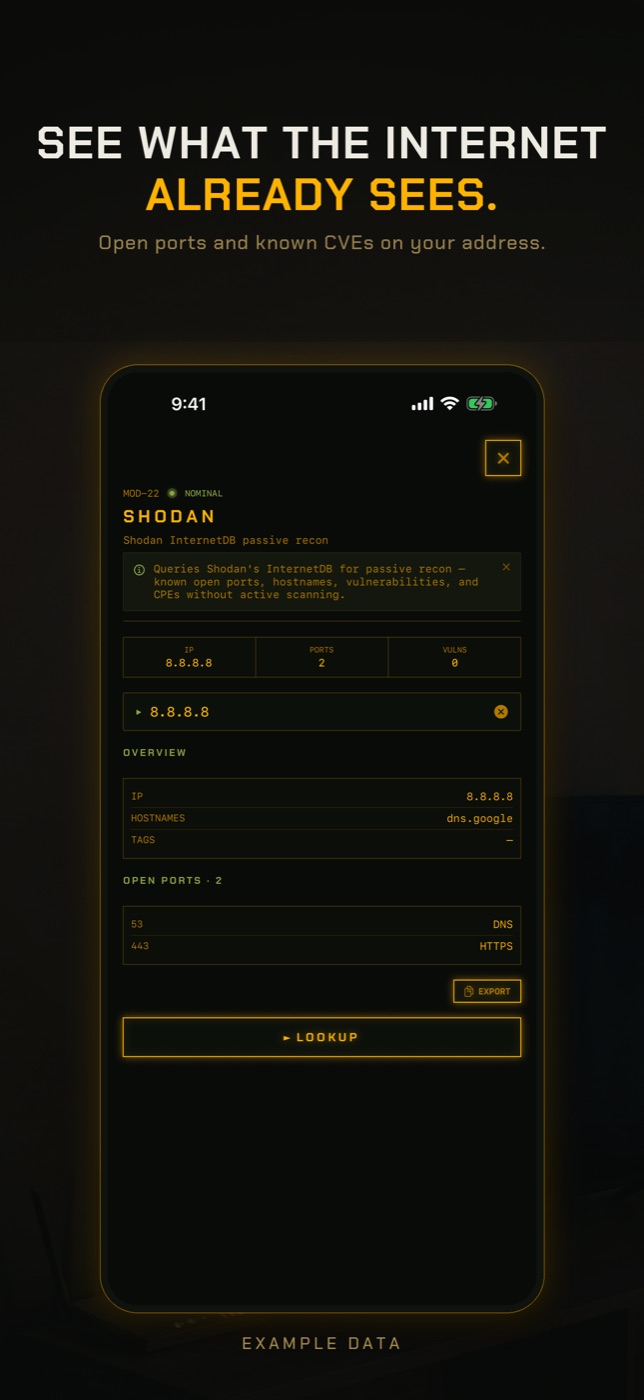
RECON's Exposure Check looks at your network from the outside. It finds your public address and looks it up in Shodan's InternetDB, a record of internet-wide scans. Nothing is scanned from your phone; it reports what scanners have already seen.
- Connect to your home network and tap RUN on Exposure Check in the checks row. It takes 10 to 30 seconds.
- It shows your public address and the ports scanners found reachable on it. Ports that are a problem specifically because they are public, such as Telnet on 23, Windows file sharing on 445, Remote Desktop on 3389, VNC, FTP, SNMP and RTSP camera streams, are called out one by one.
- It lists published vulnerabilities associated with the address and the software scanners identified, and any public hostnames that point at it. The vulnerabilities describe the identified software, not a confirmed exploit on your network.
- If Shodan has never scanned your address, the check says so rather than reporting nothing open. It also reminds you that on carrier-grade NAT the address may be shared and the findings may belong to someone else.
- To see which device inside is responsible for an open port, open your router's port forwarding and UPnP tables, or use Port Scan and Shodan Lookup to look further.
Public IP versus your home network
Devices at home have private addresses like 192.168.1.20 that only mean something inside your network. The router has one public address, given by your provider, that the rest of the internet sees for all of them. By default the router lets replies to your own requests back in and drops everything else, which is why most homes expose nothing at all.
Exposure happens when you, a device, or your provider tell the router to let unsolicited connections through. Automated scanners sweep every public IPv4 address continuously, so an open service is usually found within hours of being opened, and attempts to log in or exploit it follow.
Port forwarding, UPnP and DMZ
Port forwarding is a rule you create: connections to a given port on the public address go to one device inside. It is how people reach a home server, a NAS or a game host. Every forward is a door, and the risk is whatever answers behind it: an unpatched NAS, a camera with a default password, or Remote Desktop on port 3389 or Windows file sharing on 445, which are constantly attacked.
UPnP lets devices on your network create those forwards themselves, without asking. Games consoles use it for multiplayer and it usually works as intended. The problem is that any device can use it, including a cheap camera or a compromised gadget, and on some routers UPnP itself has been reachable from the internet. Is UPnP safe? It is a convenience that trusts every device on your network; if you do not need it, turn it off, and if you do, check its table of forwards now and then.
A DMZ setting, sometimes called exposed host, forwards every port to one device. It is the broadest exposure a home router offers and is rarely needed.
Remote management, TR-069 and router admin ports
Many routers can be managed from the internet. Providers use TR-069 on port 7547 to configure and update customers' routers, and flaws in it have been used to take over hundreds of thousands of routers at once. Some routers use port 4567 for provider management too. MikroTik routers expose their Winbox admin tool on port 8291 if the firewall allows it, and many routers can show their web admin page to the internet if remote administration is switched on. Old routers may still answer Telnet on port 23, which sends passwords in plain text.
A router admin page reachable from the internet is one of the most common routes to a hacked router. Signs that a router has already been taken over include DNS servers you did not set, admin passwords that no longer work, new port forwards, and remote management switched on when you never enabled it.
Carrier-grade NAT: when nothing inbound reaches you
Many mobile, fibre and satellite providers put customers behind carrier-grade NAT, sharing one public address among many homes. You can tell from the router's own status page: if its internet or WAN address falls in 100.64.0.0 to 100.127.255.255 (the range 100.64.0.0/10, which the subnet calculator can confirm), you are behind CGNAT. Nothing unsolicited from the internet reaches your router over IPv4 at all, so port forwarding cannot work and your home is not directly exposed. The public address you see on a what-is-my-IP site then belongs to your provider, and anything recorded on it may belong to another customer. IPv6, where your provider offers it, is separate and is not covered by CGNAT.
What Shodan is
Shodan is a search engine that scans the internet and records what answers on each public address: open ports, the software identified behind them, and known vulnerabilities for that software. Researchers, attackers and defenders all use it. Its free InternetDB service returns this summary for a single address, without you scanning anything yourself.
How to check without an app
Your router's admin page shows the causes of exposure directly. An outside scan confirms what they lead to.
- Open your router's admin page (usually 192.168.1.1 or 192.168.0.1) and read the port forwarding or virtual server list. Delete anything you do not recognise or no longer use.
- Find the UPnP section and look at its table of current forwards, which shows which device asked for each one. Turn UPnP off if nothing you use needs it.
- Check that DMZ or exposed host is off, and that remote management, remote administration or web access from WAN is off unless you deliberately use it.
- Check the router's WAN or internet address. If it is in 100.64.0.0/10 you are behind carrier-grade NAT and not directly reachable over IPv4.
- Update the router's firmware from the admin page, and change the admin password if it is still the one on the sticker.
- Test from outside: switch your phone to mobile data, look up your home's public address on a what-is-my-IP site from home first, then run an online port scanner against it from the phone. Only scan addresses you are responsible for.
What this cannot tell you
A lookup of what scanners have recorded is a useful outside view and a limited one.
- Shodan's data is a snapshot from whenever its scanners last visited, not a live scan. A port you opened this morning may not be listed yet, and one you closed last week may still be.
- An address that has never been scanned is not clean. It means nobody has looked. Home addresses also change, so a record may describe a previous customer who had the same address.
- It says nothing about your router's firmware version or its known vulnerabilities unless the scanners identified the software on an open port. A router with no open ports can still be running outdated, vulnerable firmware.
- It does not show which device behind the router is responsible for an open port. That is in your router's port forwarding and UPnP tables.
- Internet-wide scanners cover UDP services far less thoroughly than TCP, so exposed UDP services can be missing from the record.
- It cannot tell you whether your router has already been hacked. A compromised router may show no open ports at all while sending your DNS lookups somewhere else.
How do I tell if my router is hacked?
Look in the admin page for things you did not set: different DNS servers, new port forwards, remote management turned on, an admin password that no longer works, or unfamiliar firmware. Browser warnings or redirects on sites you use every day are another sign.
Is UPnP safe?
It lets any device on your network open ports to the internet without asking you. With trusted devices and an up-to-date router the risk is modest; with cheap smart-home gadgets it is higher. Turn it off if you do not need it and check its table if you do.
What ports are open on my router?
From inside, your router's port forwarding and UPnP tables list what you have opened. From outside, a record of internet-wide scans such as Shodan shows what scanners saw, and an online port scan run from mobile data shows the current state.
Is port forwarding a security risk?
Every forward exposes one device to the whole internet, so the risk is the device behind it. A patched game server is low risk; a NAS admin page, Remote Desktop or a camera stream is a common target.
What is port 7547 on my router?
It is TR-069, the protocol many providers use to manage customers' routers remotely. It is often open by design on provider-supplied routers, and it has been exploited in the past, so keep the firmware updated.
How do I know if I am behind CGNAT?
Compare the router's WAN address with the address a what-is-my-IP site shows. If the router's address is in 100.64.0.0/10, or the two differ, you are behind carrier-grade NAT and unsolicited connections from the internet cannot reach you over IPv4.
Can Shodan see my home network?
It sees your public address and whatever answers on it. If nothing is forwarded or exposed, it records no open ports. It cannot see the devices behind your router unless one of them has a port opened to the internet.
Everything above that needs a scan, the app does in one tap on the Wi-Fi you are on, and it says what it could not see. Get RECON for iPhone — one-time purchase, no account, nothing leaves the device.