Is my baby monitor hacked?
It depends on the kind of monitor. A plain audio or DECT monitor with its own parent unit is not connected to the internet and cannot be hacked from it, though a nearby receiver may pick it up. A Wi-Fi monitor that you watch through a phone app is an internet camera, and it can be reached through a weak account password, a default device password, or a port opened on your router.
For a Wi-Fi monitor, RECON can answer the questions that decide whether a stranger could reach it: is anything at home open to the internet, what is the monitor answering on inside your network, and has something new joined your Wi-Fi. It cannot see into the monitor's app account.
- Run Exposure Check. It looks up your network's public address in Shodan InternetDB, a record of what internet-wide scanners have seen, and lists any ports they found open, published vulnerabilities and hostnames. Port 554 is flagged by name because an open RTSP port is the usual way a camera ends up public. Ports 554, 80, 8000 or 443 showing here, when you did not set up remote access yourself, are worth tracing to a device. Exposure Check does not say which device behind your address is responsible.
- If Exposure Check says your address has never been scanned, read that literally: there is no record either way, which is not the same as nothing being open.
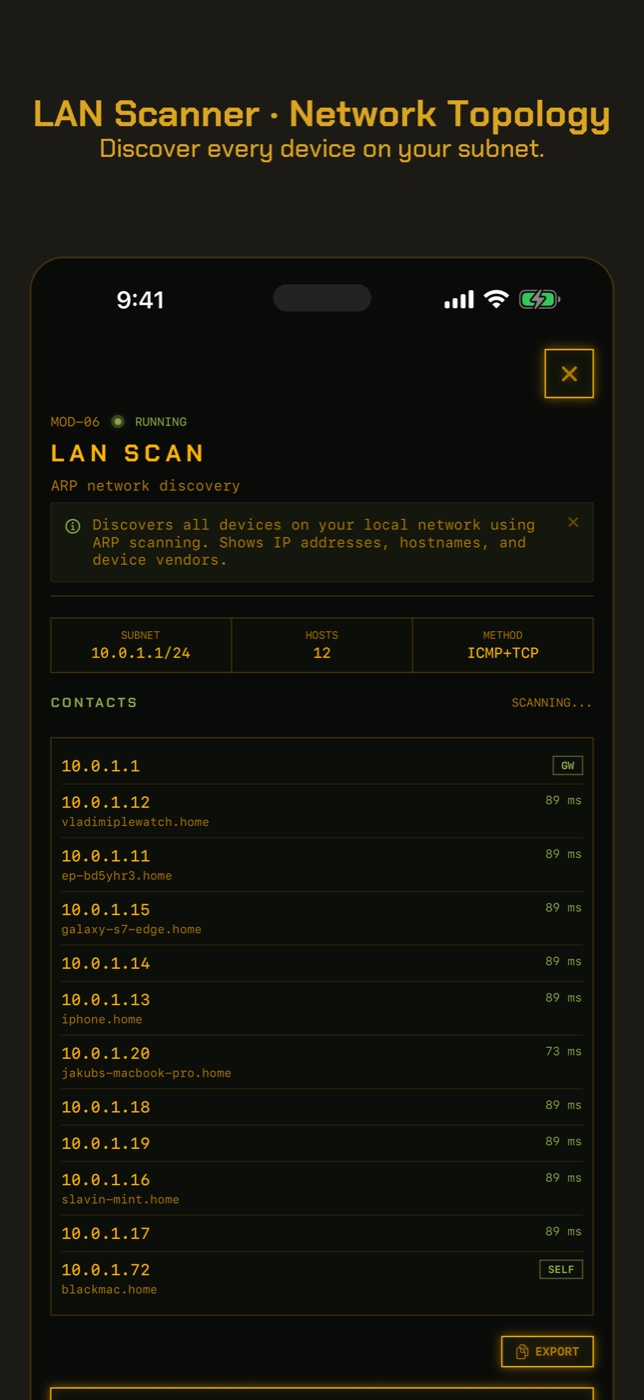
- Open LAN Scan to find the monitor's address and manufacturer, then run Port Scan on it. An open web port such as 80, or 554 for video, means it serves a login page or stream inside your network, which is where a default password matters.
- Run New Device Check. The first run on a network only records a baseline of what answers, so it cannot find anything yet. Run it again later and it lists anything not seen before, matched by hardware address where it can, with the manufacturer the address is registered to.
Which kind of baby monitor do you have?
Analogue and DECT monitors come as a pair: a unit in the nursery and a parent unit that picks it up by radio. They do not join your Wi-Fi and have no internet connection, so nobody on the internet can reach them. The risk is local. Older analogue monitors broadcast openly and can be heard on a compatible receiver nearby; DECT is encrypted on most modern models and much harder to listen to. Either way, a stranger would need to be close to your home.
A Wi-Fi monitor, the kind you watch on your phone, is an IP camera by another name. It sits on your home network and usually talks to the maker's cloud so the app can reach it from anywhere. Everything that goes wrong with security cameras can go wrong with it.
How Wi-Fi baby monitors get hacked
The cases that made the news come down to the same few mistakes. In 2013 a family in Houston heard a stranger shouting at their toddler through a Foscam camera used as a baby monitor, after it was reached over the internet. In 2015 Rapid7 tested nine popular Wi-Fi baby monitors and found problems in all of them, including hard-coded passwords that owners could not change.
- Reused account passwords. If your app account shares a password with a site that leaked, someone can sign in as you.
- Default device passwords. Cheaper monitors sometimes ship with a fixed admin password for their local web page or video stream.
- Port forwarding and UPnP. Some monitors ask the router to open a port so the phone can connect directly, which also lets the whole internet connect.
- Old firmware. Monitors that no longer get updates keep whatever flaws they shipped with.
The Shodan problem
Search engines such as Shodan scan the whole internet and record every device that answers, including cameras that serve video or a login page on an open port. A monitor reachable this way can be found by anyone who looks, without knowing anything about you. The fix is not to hide from Shodan; it is to make sure nothing on your network is open to the internet in the first place.
Signs your baby monitor is hacked
Rule out a partner or relative using the app, then look for:
- A voice, music or noise coming from the monitor's speaker that nobody in your home made.
- The camera panning or tilting by itself, or pointing somewhere you did not leave it.
- The app showing another viewer or session, or a sign-in alert for a phone you do not own.
- Night-vision lights or a status light switching on when nobody is watching.
- Settings, names or passwords changed, or you are locked out of the app.
If you think it is happening now
Unplug the monitor. Then change the app account password, turn on two-step verification if the app offers it, and remove any shared users. On the router, remove port forwards to the monitor and turn off UPnP. Update the firmware, change any device password from its default, and only then plug it back in. If the model no longer receives updates, replace it.
How to check without an app
These cover what a scan cannot.
- The monitor's app: account password, two-step verification, shared users and signed-in devices.
- The router admin page: port forwarding rules pointing at the monitor, and the UPnP setting. Turn UPnP off.
- The monitor's own settings: change any default admin password and update the firmware.
- Factory reset the monitor with its reset button if you cannot account for changed settings, then set it up again with new passwords.
- For an audio or DECT monitor none of the above applies. If eavesdropping worries you, keep the nursery unit away from walls you share with neighbours.
What this cannot tell you
A phone scan answers the network questions. The account and radio questions need other checks.
- Whether anyone is signed in to your monitor's app account or watching right now.
- Anything about an analogue or DECT monitor. They are not on your network, and RECON does not detect radio signals.
- What the monitor sends to its maker's cloud. That traffic is encrypted and does not pass through your phone.
- Whether a port opened by UPnP has since been closed, if internet scanners have not looked again. Check the router's UPnP table directly.
- Whether the monitor's password is still the default. A scan can show a login page is there, not what opens it.
How can I tell if my baby monitor is hacked?
Listen for voices or sounds nobody at home made, watch for the camera moving on its own, and check the app for sessions or sign-ins you do not recognise. Then check your router for port forwards and UPnP.
Can a baby monitor without Wi-Fi be hacked?
Not from the internet. An analogue or DECT monitor can only be picked up by a receiver close to your home, and modern DECT monitors are encrypted.
Can someone talk through my baby monitor?
Through a Wi-Fi monitor with a speaker, anyone who can sign in to the account or reach the device can. Unplug it, change the password and turn on two-step verification.
Are Wi-Fi baby monitors safe to use?
They can be used securely with a unique password, two-step verification, current firmware and no ports open on your router. The risk comes from skipping those.
What is Shodan and is my baby monitor on it?
Shodan indexes devices that answer on the open internet. Exposure Check looks up your public address in Shodan's free InternetDB and shows any ports it recorded, though not which device they belong to.
Should I turn off UPnP?
Yes, for most homes. It lets devices open ports on your router without asking you. Most cloud-based monitors work without it.
Everything above that needs a scan, the app does in one tap on the Wi-Fi you are on, and it says what it could not see. Get RECON for iPhone — one-time purchase, no account, nothing leaves the device.